
 HPM understands clients want access to policy services on their schedule, not ours.
HPM Insurance is pleased to offer you convenient access to your insurance documents through the HPM Client Portal powered by InsurLink. This secure service is available 24/7 from your computer, tablet, or mobile device.
| View and download policy documents | |
| Request policy changes | |
|
Request proof of insurance (including certificates and binders) |
|
|
Receive insurance documents securely |
|
|
Send a question to your agent |
|
|
Request a quote |
|
|
File a claim from your desktop (not available on the mobile app.) |
How do I get access to the HPM Client Portal?
Protecting your information is one of our highest priorities. For security purposes, access to the HPM Client Portal is available by invitation only.
To request access, click the "Click Here" button below to email HPM Insurance. Please include "Request Client Portal Access" in the subject line along with your name and/or business name.
Once we receive your request, a member of our team will review it and send you an invitation if access is approved.
If you need assistance, we're happy to help.

What will my portal invitation look like?
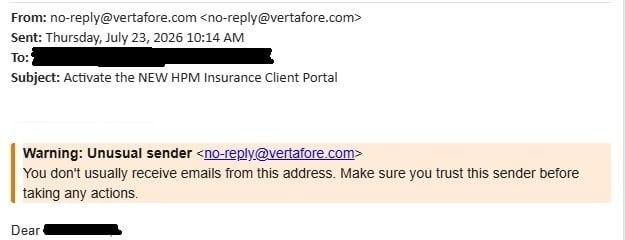
After we send your invitation, you'll receive an email from no-reply@vertafore.com with the subject line:
Activate the NEW HPM Insurance Client Portal
The email will include information about the portal and a secure activation link.
A few things to know:
- Check your spam or junk folder if you don't see the email.
- Only clients who receive an invitation from HPM Insurance can access the portal.
- Invitation links expire after 15 days.
- If your invitation expires or you can't locate it, contact us and we'll send a new one.
Tip: Add no-reply@vertafore.com to your safe sender list so portal notifications and document alerts arrive in your inbox.
Setting up your portal & Two-Factor Authentication:
After clicking the activation link in your invitation email, you'll be taken to a welcome page where you'll:
- Enter the same email address that received the invitation.
- Create your password.
- Set up two-factor authentication (2FA) for added security.
You will then see the authentication options screen.
Select Start to continue.
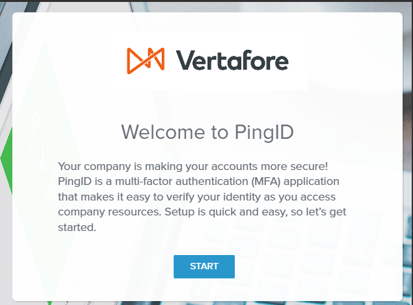
You'll have the option to download the PingID mobile app or choose another authentication method. While PingID is available, it is not required to access your portal.
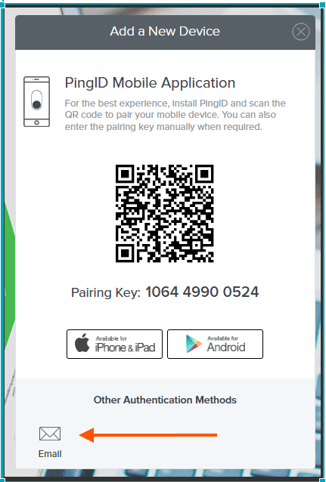
Using Email Verification
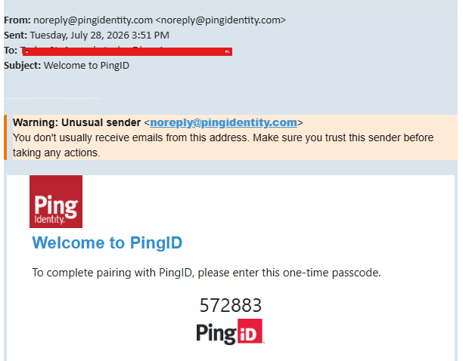
If you choose the Email authentication option, a verification email will be sent to the same email address that received your portal invitation.
The email will contain a 6-digit verification code. When prompted during the setup process, enter the code to verify your identity and complete authentication.
Once the code has been successfully entered, you will be authenticated and granted access to the HPM Insurance Client Portal.
Note: If you do not receive the verification email within a few minutes, check your spam or junk folder before requesting another code.
What if I don't receive an invitation email?
First, check your spam or junk folder. If you still don't see the invitation, the email address we have on file may not match the one you're using.
Contact HPM Insurance and we'll be happy to verify your information and resend the invitation if needed.
 What if I have multiple accounts with HPM?
If you have multiple policies under a single account, such as home, auto, and umbrella insurance, they will all appear within the Client Portal.
If you have separate accounts—such as personal and business insurance or multiple businesses—you can access them through the same portal, provided you:
- Accept a portal invitation for each account.
- Use the same email address for all accounts.
You can switch between accounts by selecting the account name under the globe icon in the portal.
What if I don't want my personal insurance linked to my business insurance portal?
You can keep your personal and business accounts separate by using different email addresses for each account.
Who is InsurLink?
InsurLink is the platform that powers the HPM Client Portal and mobile app. It provides secure access to your insurance information and documents.
Why is Two-Factor Authentication required?
Protecting your personal information is a top priority. Two-Factor Authentication helps ensure that only authorized users can access your insurance information, providing an added layer of security and privacy.
Do I have to download the mobile app?
No. The Client Portal can be accessed through any web browser.
However, the InsurLink mobile app provides added convenience, including access to insurance ID cards and important policy information while you're on the go.
If multiple members of your household need access, we can send each person their own portal invitation.
Contractors can also use the portal to request, receive, and access certificates of insurance from virtually anywhere.
How do I download the mobile app?
Download the InsurLink app from your device's app store and sign in using your credentials. The app will look like this:

Can multiple users access my policies in the Client Portal?
Yes. If you would like additional users to access your insurance information through the portal, let us know, and we will send them an invitation.
For your protection, HPM Insurance will not grant portal access to anyone without the insured's authorization.
Can I pay my bill through the Client Portal?
For security reasons, bill payments cannot be made through the HPM Client Portal. However, you can access your insurance carrier's payment portal through our Companies We Represent page.
How will I know when a document has been added to the Client Portal?
You will receive an email notification whenever HPM posts a document to your Client Portal. Documents may include policies, renewals, certificates of insurance, binders, and other important insurance-related documents.
Because of the volume of documents we process, documents are not automatically uploaded to the portal. However, if you prefer to receive documents through the portal, please let us know.
Can I access the Client Portal if I have life, health or pet insurance through HPM?
At this time, life, health, and pet insurance policies cannot be linked to the Client Portal.
What if I don't want to use the HPM Client Portal?
That's completely your choice. HPM Insurance wants to communicate with you in the way that works best for you—whether that's in person, by phone, email, text message, or through the Client Portal.
If you previously enrolled in the portal and would no longer like your policies and documents available there, please contact us so we can update your communication preferences.
I'm Currently Using the Previous HPM Client Portal. What Do I Need to Do?
HPM Insurance has transitioned to a new Client Portal powered by InsurLink to provide enhanced functionality and an improved client experience.
If you previously used the HPM Client Portal through GloveBox, you'll need to activate your new portal account using the invitation sent by HPM Insurance.
If there are documents you'd like available in your new portal account, please let us know.
What if I forget my Client Portal password?
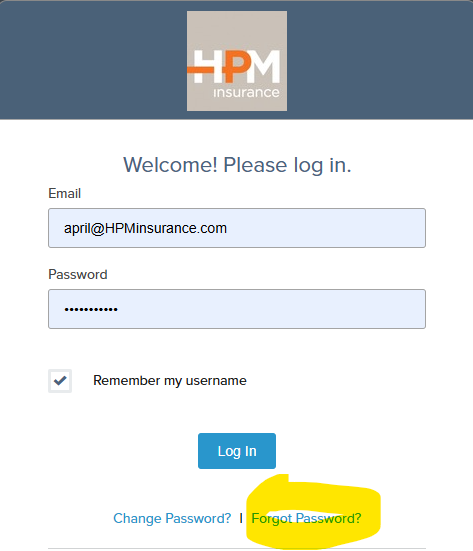
HPM Insurance does not manage portal passwords. To reset your password, visit the Client Portal login page and select Forgot Password.
HPM Insurance is here for you!
The HPM Client Portal is designed to enhance—not replace—the personal service you receive from our team.
Whether you prefer to communicate by phone, email, text, or through the portal, we're here to help. The portal simply provides convenient access to your insurance information and services whenever you need them.
Thank you for choosing HPM Insurance. We appreciate your business and hope you find the Client Portal to be a valuable tool for managing your insurance needs.